Red Chat Ritual TSUMIMI TIME Walkthrough: Chapters, Clues, and Endings
Complete Red Chat Ritual TSUMIMI TIME walkthrough for PC. Learn core investigation loops, day-night pacing, and how to unlock all endings safely.
Last updated:
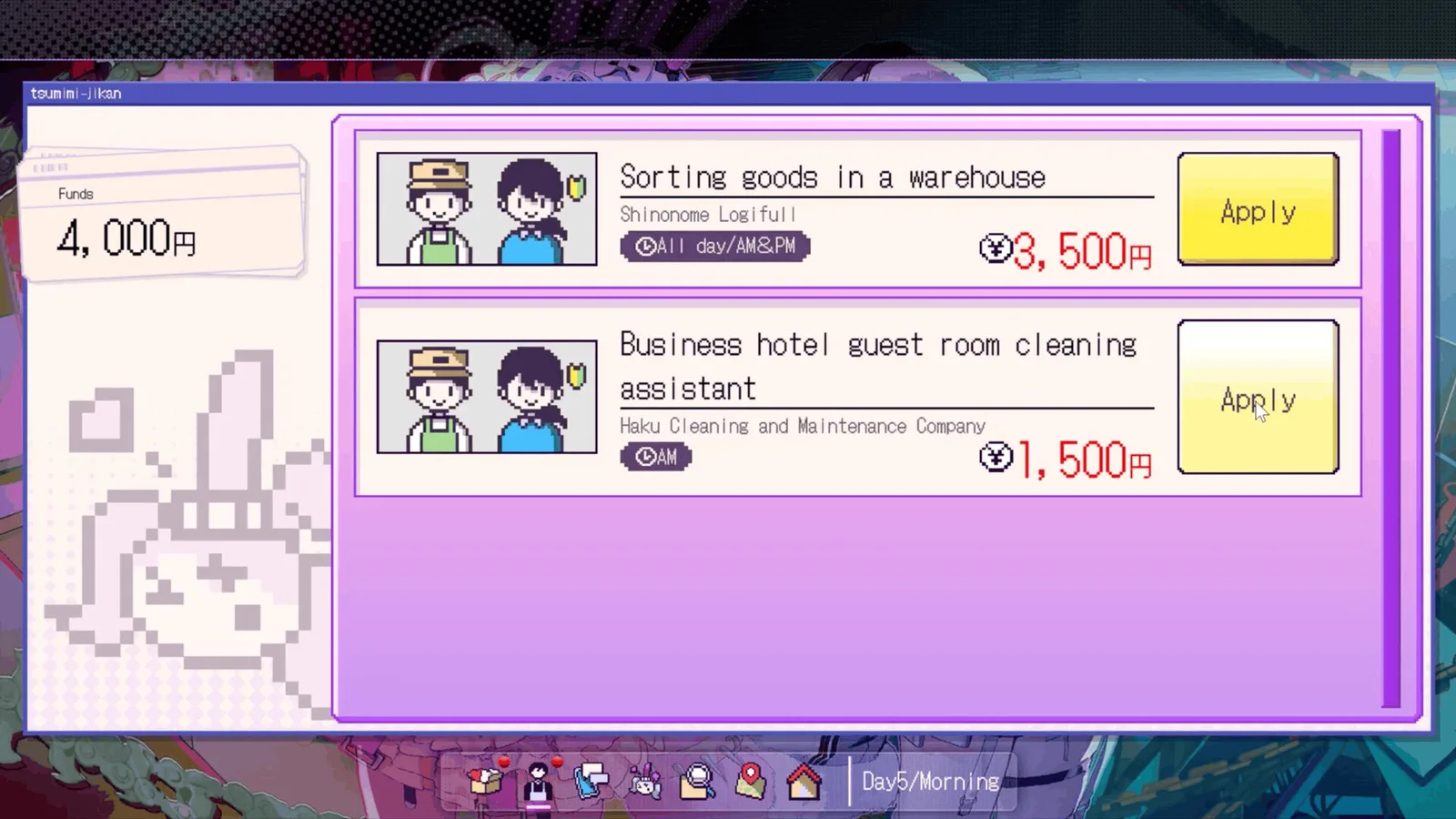
The walkthrough is a 15-day two-phase loop: earn and search by day, then spend on Mega Chats by night — the Day 15 deduction is scored against the files you gathered, not against your choices at the end.
- Days 1–5 teach the loop and hide the first newspaper clue
- Days 6–10 open the cult ruins and the floor-check branch
- Days 11–15 are altars, family history and the final deduction
Doesn't apply when: You skip daytime jobs for several days and run out of money before Day 14
Source note: Chapter deadlines, item requirements and Steam achievement percentages on this page come from the official Steam store listing for AppID 4413070 and our own playthrough on Version 1.0.1 (October 2026). Anything marked Unverified is a community report we could not reproduce in our own matches — treat it as a lead, not as a mechanic.
Red Chat Ritual TSUMIMI TIME Walkthrough and Core Mechanics
Welcome to the definitive Red Chat Ritual TSUMIMI TIME and reference guide for Tohakusha Inc.'s psychological horror visual novel. Released on Steam on October 22, 2026, for Windows, this title places you in the shoes of an obsessed viewer rather than the protagonist. Throughout your run, you will monitor the live broadcasts of a struggling indie idol named Tsumimi—a 19-year-old member of the idol unit Wataame Chainsaw—while she investigates an eerie, abandoned village to find her missing partner, 18-year-old Mashiro Tsukioka.
The gameplay loop is divided into a strict day-and-night cycle. During the day, your responsibility as a viewer is to manage your funds through part-time warehouse jobs, search for vital keywords across the in-game social media network, consult digital maps, and read fan site notices. At night, you transition into active stream intervention. By deploying comments, paid Mega Chats, and specific wishlist gifts, you must guide Tsumimi through hazardous locations without triggering a game over. Your investigative findings feed directly into deduction puzzles that dictate the story's trajectory.
Understanding this flow requires balancing your monetary resources, timing your gift deliveries before evening broadcasts, and correctly pairing your investigation files with deduction blanks. Because the game features multiple branching paths, knowing how time progresses and how clues interconnect is vital for securing favorable outcomes.
Understanding the Day-and-Night Progression Cycle
Time management is the single most critical element of any successful playthrough. The adventure unfolds across a multi-day timeline on Windows PC, where every action carries a specific time cost. Executing searches on the social media feed or map system advances the in-game clock. Similarly, applying for part-time jobs in the warehouse consumes hours based on the shift length.
During daytime hours, you cannot interact with Tsumimi directly via her live broadcast. Instead, you must lay the groundwork for the upcoming night by gathering search keywords. These keywords typically drop during stream chats or through official community updates, but possessing a keyword is only half the battle. You must open your social media tool, enter the keyword, read through associated posts and replies, and verify that the data has successfully populated your investigation files.
| Time Period | Primary Activities | Resource Cost |
|---|---|---|
| Morning | Part-time warehouse jobs, checking social media feeds | Consumes hours based on shift length |
| Afternoon | Keyword investigation on maps, reading fan site comments | Consumes time per search query |
| Night | Stream viewing, Mega Chat deployment, gift dispatch | Uses accumulated funds and donations |
Failing to complete these investigative steps before moving forward will leave your deduction files empty when you reach chapter milestones. Always check your bottom-screen status bar for the current date, time slot, and available funds before confirming any major investigation action.
Managing Funds, Part-Time Jobs, and Wishlist Gifts
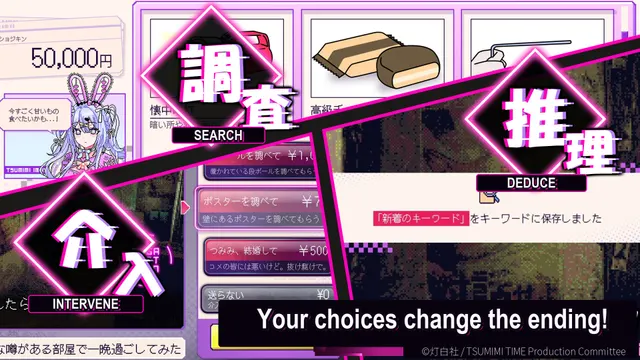
Financial planning dictates your ability to influence Tsumimi's survival. Early in the game, you will need to take on warehouse sorting tasks to build a healthy cash reserve. Following the Ver.1.0.1 update released on October 23, 2026, developers increased starting funds to ease early-game pacing, but you must still spend wisely between funding high-tier Mega Chats and purchasing items from Tsumimi's wishlist.
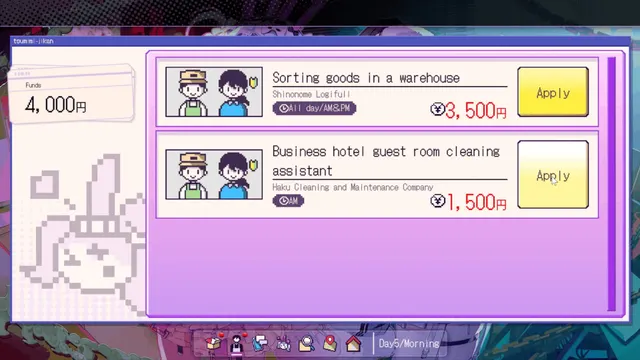
Wishlist gifts operate on a strict timing rule: they must be ordered and confirmed before that day's stream begins. If a gift arrives late, Tsumimi will miss the opportunity to use it, which can lock you out of crucial environmental interactions. For example, certain items like the stun gun must be sent prior to specific chapters to unlock hidden floor inspections, while items like the potato gun serve distinct narrative and exploratory functions.
| Item Category | Acquisition Method | Operational Purpose |
|---|---|---|
| Part-Time Jobs | Warehouse job board selection | Generates operational funds (e.g., 5,000 yen shifts) |
| Wishlist Gifts | Convenience store delivery network | Modifies streaming events and unlocks environmental checks |
| Mega Chats | Direct stream interface | Delivers immediate paid messages to alter Tsumimi's behavior |
You do not need to purchase every item on the wishlist during a single run. Prioritize tools that tie directly into upcoming investigative bottlenecks, keeping enough currency on hand to deploy expensive Mega Chats when a dangerous situation unfolds on stream.
Investigating Keywords, Maps, and Investigation Files
The core investigative puzzle requires you to synthesize information gathered from three distinct digital channels: social media posts, map searches, and fan site commentaries. When Tsumimi drops a keyword during her stream—such as references to the underground idol agency or the last known location where Mashiro was spotted—you must immediately cross-reference it using your home interface.
Navigating this system successfully means looking past surface-level search results. When using the social media tool, expand the reply threads attached to main posts, as critical lore and password hints are frequently hidden in secondary comments. Similarly, map searches will highlight specific geographical points of interest, such as abandoned chapels, ritual prayer rooms, and mountain tunnels exhibiting distinct architectural anomalies like hexagonal structures.
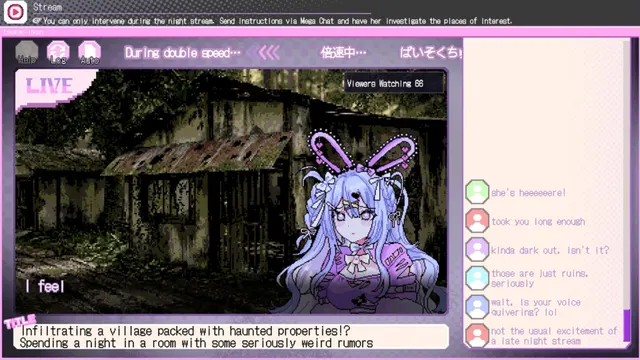
- Step 1: Stream Acquisition: Watch the evening broadcast and note any highlighted search keywords.
- Step 2: External Search: Input the keyword into the social media module or map search utility.
- Step 3: Deep Verification: Read through user replies, comments, and location pins to extract hidden details.
- Step 4: File Confirmation: Open your investigation file to ensure the data is properly cataloged before nightfall.
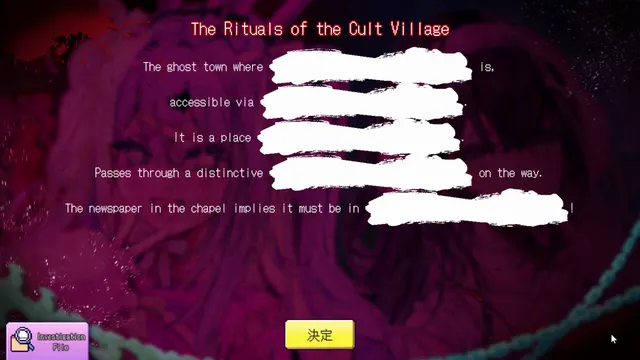
If a deduction prompt presents empty blanks that you cannot fill, do not guess blindly. This indicates a missing file link or an unexamined reply thread. Drop back to the investigation menu, re-read your files, and ensure you have fully explored the digital trail.
Stream Interventions and Mega Chat Strategy
Nighttime sequences are where psychological tension peaks. As Tsumimi streams her solo investigations inside the condemned village, you must monitor her safety and emotional state. Using standard text comments and paid Mega Chats allows you to steer her actions, warn her of approaching threats, or urge her to flee when local cult activity or mysterious stalkers close in.
However, moderation is essential. Pushing Tsumimi too hard with aggressive commands or inappropriate messages can result in being blocked from the channel, leading straight to a premature game over screen. Conversely, strategic silence is sometimes more effective than continuous intervention, allowing her to navigate minor obstacles without panicking.
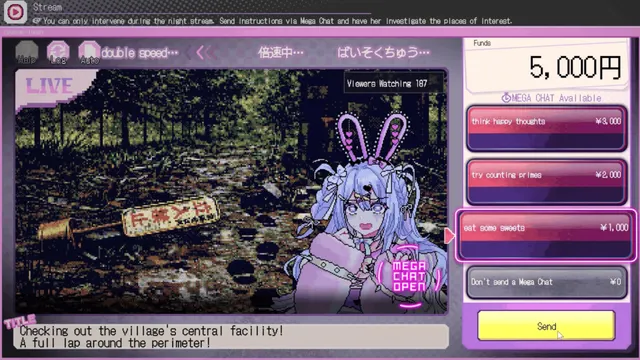
| Intervention Type | Cost | Primary Effect | Risk Factor |
|---|---|---|---|
| Standard Comments | Free | Modulates stream chat mood | Minimal impact on dangerous situations |
| Paid Mega Chats | Varies by tier | Directs immediate attention and forces dialogue | High cost, risks channel block if mismanaged |
| Gift Dispatch | Item price | Alters next-day physical events | Must be ordered before evening broadcast |
Players revisiting chapters can utilize quality-of-life additions introduced in recent patches. Holding down the Ctrl key during in-game streams allows you to fast-forward at ultra-high speeds straight to the next Mega Chat prompt, making repeat playthroughs and alternative decision-testing significantly smoother.
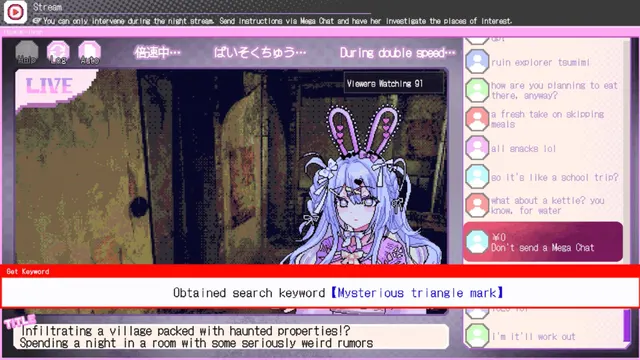
Navigating Chapters, Puzzles, and Decision Brackets
The narrative is structured around distinct investigative phases, moving from initial urban inquiries into the dark history of the abandoned mountain settlement. While the game features three primary chapters leading up to the final day-15 resolution, players must carefully weigh their choices against the physical evidence collected during daytime hours.
Chapter milestones test your comprehension of the clues. For instance, newspaper clippings found via Mega Chat prompts on Day 5 and floor anomalies investigated on Day 7 require exact contextual matches in your final deductions. A failure in these logical pairings results in inference failure endings, accounting for a notable percentage of initial player run failures according to Steam global statistics.

| Chapter Focus | Primary Objective | Key Investigatory Milestone |
|---|---|---|
| Chapter 1 | Local disappearance & agency ties | Securing initial search keywords and newspaper leads |
| Chapter 2 | Abandoned village structures | Utilizing wishlist items to inspect interior flooring |
| Chapter 3 | Cult history & inherited beliefs | Reconciling survivor notes with physical evidence |
| Final Resolution | Ending branch determination | Completing final deduction blanks before Day 15 |
Achieving all game outcomes requires meticulous save management. Always create a manual save point before entering a night stream or committing to a major investigation expenditure, ensuring you can step backward to test alternative dialogue trees without restarting the entire game.
Day by day: what is confirmed, and what is not
Every guide on this game describes the same fifteen days, but very few say how much of each day they can actually vouch for. This table does. A Confirmed row is reproduced or stated officially; Observed is something we saw once and could not isolate; Unverified means we do not know, and the gap is listed on the open questions page rather than filled with a guess.
| Day | What we can state | Confidence |
|---|---|---|
| Day 1 | Loop tutorial: job board, keyword pickup, first stream | Confirmed |
| Day 2 | Keyword search on SNS; files only appear after reading replies | Confirmed |
| Day 3 | Funds from Day 1–2 decide whether the potato gun is affordable | Observed |
| Day 4 | Potato gun must arrive before this night's stream | Confirmed |
| Day 5 | Newspaper scene appears only if the potato gun landed | Confirmed |
| Day 6 | Stun gun must arrive before this night's stream | Confirmed |
| Day 7 | Floor check requires the stun gun; also seen missing after a skipped Day 6 stream | Confirmed / Observed |
| Day 8 | Chapter 2 opens; the village interior becomes searchable | Confirmed |
| Day 9 | No confirmed deadline. This is where most runs drift | Unverified |
| Day 10 | Chapter 2 gate; blanks scored against Chapter 2 files | Observed |
| Day 11 | Altar and family-history material becomes available | Observed |
| Day 12 | No confirmed deadline or required item | Unverified |
| Day 13 | Chapter 3 material; no confirmed gating event | Unverified |
| Day 14 | Save here before the final stream — this is the last clean rollback point | Observed |
| Day 15 | Final deduction decides the ending; one wrong blank routes to End 8 | Confirmed |
Four rows are Unverified, and they are the middle of the run — Days 9, 12 and 13 plus the exact gate mechanics of Day 10. That is the honest shape of what is documented about this game two days after release: the deadlines at both ends are known precisely, and the middle is described by everyone and verified by nobody. If you are writing your own notes, those are the days worth recording carefully.
Understanding Steam Achievements and Global Unlock Rates
For completionists tracking their progress across multiple runs, Red Chat Ritual TSUMIMI TIME features 16 Steam achievements tied to specific survival milestones, gallery completion, and narrative conclusions. According to Steam global telemetry data, community engagement heavily skews toward early stream survival and initial failure states, while true completion requires dedication across multiple branching paths.
| Achievement Name | Global Unlock Rate | Description |
|---|---|---|
| LIVESTREAMING_DAY1_WATCHED | 87.3% | Successfully complete and watch the opening Day 1 stream |
| ENDING_INFERENCEFAILED | 55.0% | Reach a conclusion failure during early deduction checks |
| ENDING_LIVESTREAMBLOCKED | 33.0% | Trigger a channel ban by mishandling viewer interactions |
| ENDING_DIEDINSTANTLY | 17.8% | Succumb to immediate environmental hazards |
| ENDING_ALLBAD | 16.1% | Experience all primary failure-state conclusions |
| ENDING_NORMAL | 10.9% | Complete a standard narrative resolution |
| ENDING_SUPERTRUE | 8.0% | Uncover the ultimate narrative truth |
| ENDING_TRUE | 7.8% | Reach the primary canonical conclusion |
| ALL_ENDINGS_SEEN | 2.2% | Unlock all narrative conclusion branches |
While official store copy refers broadly to six main endings, the achievement structure supports multiple failure and extra variations. Experimenting with different Mega Chat choices and gift timings is the only way to fill out your gallery data and achieve 100% completion.
Frequently Asked Questions
Related
- Guide hub — the reading order
- Beginner guide — the loop explained once
- Troubleshooting — when a day will not advance
Is Red Chat Ritual TSUMIMI TIME a horror game?
Yes, it is classified as a psychological horror adventure and visual novel. It contains unsettling atmospheric tension, horror imagery, and themes of obsession and streaming isolation.
How many endings are there in the game?
The official store documentation points to six main narrative conclusions, backed by a comprehensive achievement system that tracks multiple success, failure, and extra paths across your playthroughs.
What is the playtime for a single run?
A standard single playthrough takes approximately three to four hours. Seeing all branching paths and unlocking every ending will extend total playtime to roughly six to eight hours.
How do I fix an inference failure during deductions?
If your deductions fail, you likely missed a crucial keyword or failed to open an investigation file after searching social media or maps. Revisit your daytime investigative loop to ensure all files are fully unlocked.
Where can I check official hints if I get stuck?
You can consult the official community guides and Hints & FAQ hub on the Red Chat Ritual TSUMIMI TIME Steam Community Hub for spoiler-managed assistance.
Can I finish the walkthrough without doing part-time jobs?
No. Mega Chats and wish-list gifts are the only way to steer the stream, and both cost money that only daytime jobs provide. Skipping jobs for two or three days leaves you unable to afford the Day 14 intervention.
Related Guides
Demo Save Won't Carry Over to the Full Game — TSUMIMI TIME
The TSUMIMI TIME demo is a separate Steam app (AppID 4793590) with its own save location, so there is no import path into the full game. Here is where each build stores its data and why copying files fails.
I Have the File but Can't Select It — TSUMIMI TIME Deduction Blanks
Why a deduction blank in Red Chat Ritual TSUMIMI TIME refuses a file you already own: the file is the wrong one for that blank, the keyword behind it was never fully investigated, or the blank belongs to a different chapter.
I Sent a Gift and Nothing Happened — TSUMIMI TIME Gift Timing
Why a gift in Red Chat Ritual TSUMIMI TIME does nothing: it arrived after that night's stream, the wish-list item is not one of the two timed gifts, or the scene it unlocks sits on a later day.
Keyword Won't Become an Investigation File — TSUMIMI TIME
A keyword in Red Chat Ritual TSUMIMI TIME only becomes an investigation file after it is actively searched and the reply thread is read. Here is the five-step check when nothing appears in the archive.
Open Questions — What We Still Can't Confirm About TSUMIMI TIME
Seven things we could not confirm about Red Chat Ritual TSUMIMI TIME, each with what we tried, the best current answer and a confidence rating. Written down instead of guessed at.
Red Chat Ritual TSUMIMI TIME Gameplay Guide: Stream Interventions, Chapters, and Ending Solutions
Red Chat Ritual TSUMIMI TIME gameplay explained: the daytime investigation loop, night livestream choices, Mega Chat spending and how endings branch.